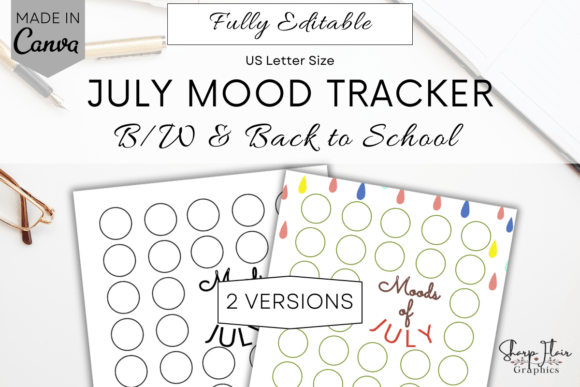
July Mood Tracker Canva Template
Tracking how you feel—day by day, week by week—is one of the simplest yet most powerful ways to understand your emotional rhythm. The July Mood Tracker Canva Template is a thoughtfully designed, fully editable digital journal built for exactly that: helping you observe, reflect on, and gently shape your inner landscape during the month of July.
This isn’t a static worksheet or a rigid app with locked features. It’s two clean, printable-and-editable pages (8.5" × 11")—one in classic black and white, the other with a soft rain-inspired “Back to School” theme—designed to work seamlessly inside Canva. You’ll receive a single ZIP folder containing a PDF with direct links to both versions in Canva. No physical item ships. Just instant access—and full creative control.
Why This Matters Differently for Different People
What makes this tracker useful isn’t just its design—it’s how flexibly it fits into *your* life, not someone else’s idea of productivity.
For educators and counselors, July often means quiet reflection before the academic year ramps up. A mood tracker like this becomes a gentle self-care tool—and a low-stakes way to model emotional awareness. You might use it to notice when rest feels scarce, or when planning energy peaks. Because it’s editable in Canva, you could even adapt one version into a student-facing handout (with permission and appropriate framing), using simple icons or emoji-style moods instead of color codes.
Freelancers and small business owners often juggle shifting deadlines, client feedback, and unpredictable income—all while managing energy across time zones and roles. With this template, you’re not just logging “happy” or “stressed.” You’re mapping patterns: Do creative bursts happen midweek? Does energy dip after back-to-back Zoom calls? Since fonts, colors, and layout are editable, you can label moods in terms that resonate—like “focused,” “overwhelmed,” “inspired,” or “quiet”—and assign each a shade that feels intuitive *to you*.
Beginners exploring mental wellness may find traditional journaling intimidating. This tracker lowers the barrier: no writing required, just coloring in a box. That small, tactile act builds consistency without pressure. You decide what “mood” means—maybe it’s energy level, social capacity, or physical comfort. And because it’s only for July, it feels contained, manageable, and temporary—not another long-term commitment.
Content creators and designers appreciate tools that support both personal practice *and* professional insight. You might use the tracker to correlate mood shifts with publishing schedules, audience engagement spikes, or creative blocks. The Canva-editable format also means you can duplicate the page, tweak spacing or typography, and test how visual simplicity affects your own consistency—or even use it as a reference when designing mood-related resources for your audience.
What You Can Change—And Why That Flexibility Counts
Every element is editable in Canva—even with a free account:
- Text: Swap out pre-filled labels, add your own mood categories, adjust prompts, or translate them.
- Colors: Build your own key—assign “calm” to lavender, “tired” to slate gray, “playful” to coral. No preset meanings force your experience into someone else’s framework.
- Fonts & layout: Choose readability over trendiness if you’re scanning quickly at night—or go bold and playful if that lifts your mood just seeing it.
- Backgrounds: Use the rain-themed version for gentle transition energy, or stick with black-and-white for clarity and print efficiency.
That level of customization matters because emotional tracking isn’t about conformity. It’s about resonance. A marketer reviewing campaign launches might track “confidence,” “doubt,” and “curiosity” instead of generic “good/bad.” A new parent might log “present,” “exhausted,” and “grateful”—not as judgments, but as honest data points. The template doesn’t define your experience. It holds space for it.
Practical Ways to Use It—Without Overcomplicating Things
You don’t need to start on July 1—or finish every day. Here’s how real people integrate it:
- A writer sets a 7-minute timer each evening, colors one box, then jots one sentence in a separate notes app: “Felt scattered after three rewrites—need to batch editing days.”
- A nurse uses the black-and-white version printed and clipped to a clipboard. At shift change, she fills in her mood—no extra screen time, no login, just quiet acknowledgment before stepping into personal time.
- A remote team lead shares the Canva link internally (not the tracker itself) as a resource—framing it as “a low-pressure way to check in with yourself this month,” not a performance metric.
- A hobbyist embroiderer prints the rain-themed page, then stitches over the colored boxes later—turning daily reflection into tangible art.
None of these uses require design skills, subscriptions, or technical setup. Just a free Canva account (or a printer), and a few seconds a day.
What This Is Not—and Why That’s Okay
This isn’t clinical mental health support. It won’t diagnose, replace therapy, or analyze your data for you. It also doesn’t auto-sync, generate reports, or send reminders. And it doesn’t include mock-ups—just clean, functional pages ready for your input.
That’s intentional. Many people already use apps that do all those things—and still forget to open them. Simplicity here isn’t a limitation. It’s an invitation: to choose what matters *this month*, to adjust as you go, and to keep the focus on noticing—not optimizing.
If your goal is long-term habit building, this July-only format helps avoid burnout. If you value creativity, the editable layers let you treat tracking as part of your expressive practice. If budget matters, it’s a one-time download—no recurring fees, no ads, no upsells.
It works whether you’re testing mood awareness for the first time or refining a decade-long self-study practice. What changes isn’t the tool—but how meaningfully you meet it, today.