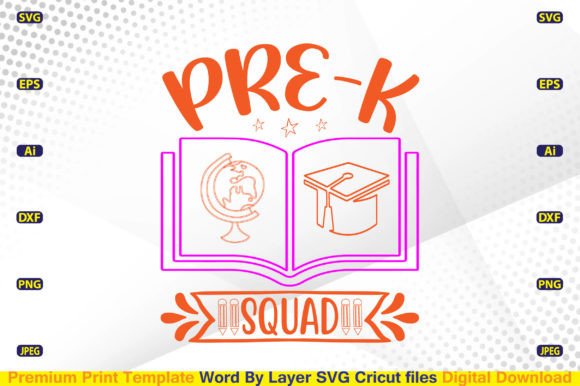
Pre-K Squad SVG Files: Smart, Layered Design Assets for Back-to-School Cricut Projects
Whether you're a small-batch apparel entrepreneur, a PTA volunteer organizing spirit wear, or a parent crafting custom tees for your child’s first Pre-K class photo day — the right digital cutting file makes all the difference. That’s where Pre-K Squad SVG files step in: thoughtfully built, commercially licensed, and engineered for real-world use with Cricut, Silhouette, and other cutting machines.
Why “Word By Layer” Matters More Than You Think
Not all SVG files are created equal — especially when it comes to layered text. With Pre-K Squad SVG designs, every word (and often every letter) is isolated on its own layer. This isn’t just visual polish — it’s functional flexibility. You can:
- Turn off specific words to personalize shirts (“Pre-K Squad” → “Emma’s Squad”)
- Adjust spacing between lines without distorting proportions
- Swap fonts mid-design by replacing only one layer instead of reworking the entire file
- Assign different colors or materials per word — perfect for multi-color vinyl projects
This level of control saves time during design prep and reduces trial-and-error cuts. It also means fewer wasted materials — a practical win whether you’re running a home-based business or prepping for a school fundraiser.
What’s Inside Your Instant Download
Your Pre-K Squad SVG purchase delivers more than just an SVG. It’s a full toolkit — one zip file containing seven professionally formatted files, each serving a distinct purpose:
- .AI (Adobe Illustrator): Ideal for designers who need editable vector paths, precise anchor point control, and seamless integration into larger branding projects.
- .SVG: The go-to format for Cricut Design Space and Silhouette Studio. Fully compatible with “Word By Layer” functionality and ready for immediate upload and cut.
- .EPS: A universal vector standard that works across older versions of CorelDRAW, Inkscape, and even some embroidery software that accepts vector imports.
- .DXF: Essential for users working with AutoCAD, CNC routers, or laser cutters — especially helpful if you’re expanding beyond heat transfer vinyl into wood signs or acrylic classroom decor.
- .PNG (4500×5400px, 300 DPI, transparent background): Crisp, high-res for mockups, social media posts, or print-on-demand previews. No white borders or pixelation — just clean, scalable clarity.
- .JPEG (same dimensions): Useful for quick sharing, email proofs, or platforms that don’t support transparency.
No hidden fees. No subscription. No watermarks. Just instant access — the moment your payment clears, you’re ready to cut, layer, and create.
Cricut & Silhouette Users: Built for Real Workflows
If you’ve ever struggled with misaligned layers, flattened text, or missing outlines in free SVGs from random blogs, you’ll appreciate how these Pre-K Squad SVG files behave in practice. They’re optimized for both Cricut Design Space and Silhouette Studio — meaning:
- Text remains fully editable (no rasterized or outlined fonts unless intentionally applied)
- Grouping is logical — no accidental nested layers that break alignment
- All strokes are set to “no stroke” or “cut edge” as appropriate — no surprise thick black lines showing up on your final cut
- Registration marks and bleed settings aren’t baked in, giving you full control over placement and sizing
For Cricut users: Upload directly to Design Space, ungroup if needed, then use the “Contour” tool to hide or reveal individual letters. For Silhouette users: Import as SVG, then use the “Release Compound Path” option only when necessary — most layers are already cleanly separated.
Commercial Use? Yes — And It’s Straightforward
Many digital sellers claim “commercial use,” but the fine print often hides restrictions — like limits on units sold, exclusions for POD platforms, or bans on resale as digital files. Not here. Your Pre-K Squad SVG license allows:
- Unlimited physical products (t-shirts, tote bags, mugs, stickers, etc.)
- Sales via Etsy, Amazon Merch, Redbubble, Teespring, or your own Shopify store
- Inclusion in client projects (e.g., designing for a preschool’s annual fair)
- No requirement to credit the designer — though we always appreciate a tag!
What it doesn’t allow: reselling the SVG file itself, uploading it to another digital marketplace, or claiming authorship. Simple, ethical, and business-friendly.
High-Resolution Clarity — Why 4500×5400px at 300 DPI Is Worth Highlighting
You might wonder: “Do I really need a PNG that large?” Yes — especially if you plan to scale up for banners, wall decals, or oversized hoodies. At 300 DPI and nearly 5,000 pixels wide, this PNG holds sharp detail even when enlarged to 24×36 inches. That means:
- No blurry previews when pitching designs to school committees
- Flawless product mockups for Instagram or Facebook ads
- Confidence when ordering large-format prints from third-party vendors
- Easy cropping for alternate layouts (e.g., turning a full-front design into a pocket-sized version)
And because the background is fully transparent, you can drop it onto any color, texture, or photo — no tedious erasing or masking required.
Design Consistency Across Platforms & Tools
Whether you're using Adobe Photoshop for quick edits, Inkscape for open-source precision, or Illustrator for professional refinement — the included AI, EPS, and SVG files retain fidelity. That consistency eliminates surprises. You won’t find:
- Missing fonts that default to system substitutes
- Shifted alignment when moving between apps
- Hidden clipping masks that prevent proper cutting
- Overlapping paths that cause double-cuts or jagged edges
Each file type was manually verified, not auto-converted. That attention shows up in smoother cuts, faster prep time, and fewer “why did that not work?” moments at 10 p.m. before drop-off day.
Real-Life Use Cases You’ll Recognize
A few examples of how educators, crafters, and small biz owners actually use these files:
- The Preschool Teacher: Prints matching “Pre-K Squad” tees for her class photo day — adds each child’s name on a separate layer, then cuts all names in contrasting glitter vinyl.
- The PTA Fundraiser Lead: Uses the DXF file to laser-cut wooden keychains for a back-to-school welcome kit — pairs them with mini SVG-printed tags.
- The Etsy Shop Owner: Loads the PNG into Canva to build lifestyle mockups, then uses the SVG to produce actual orders — scaling the same design across toddler tees, adult crewnecks, and baby onesies.
- The Homeschool Parent: Imports the AI file into Inkscape, changes “Squad” to “Crew,” adjusts the font to match their curriculum theme, and cuts iron-on for backpacks and lunchboxes.
Before You Download: A Quick Checklist
Make sure your setup is ready to go:
- You have a compatible machine: Cricut Explore Air 2 or newer, Cricut Maker series, Silhouette Cameo 4/5, or Portrait 3
- Your software is updated: Cricut Design Space v7+ or Silhouette Studio Business Edition recommended
- You understand how to unzip files on your device (most phones and computers handle this natively)
- You’ve checked your printer or vinyl cutter specs — especially for maximum width and material thickness
And remember: These are digital download only. No physical item ships. Everything arrives instantly — no waiting, no tracking numbers, no lost packages.
Stay Updated — Without the Noise
Seasonal shifts matter in education-themed design. New themes roll out each August. Classroom trends evolve. That’s why checking the creator’s gallery isn’t just a suggestion — it’s smart workflow hygiene. You’ll get early access to:
- Updated versions of bestsellers (e.g., “Pre-K Squad” with bilingual options)
- Matching accessories (backpack tags, name labels, classroom posters)
- Bundle discounts for school-year-long projects
- Design tips tailored to Cricut’s latest features — like Print Then Cut improvements or new material profiles
It’s not about chasing trends. It’s about having reliable, classroom-ready assets — precisely when you need them.